
Going Deeper Than The Core: Meet BNX
How we’re extending Moodle’s built-in BigBlueButton experience without forking it
For years, BigBlueButtonBN lived as a contributed Moodle plugin, built and maintained by Blindside Networks, downloaded onto thousands of sites, and steadily improved release after release. Then in 2021, something significant happened: Moodle HQ merged BigBlueButtonBN into Moodle core, shipping it as a built-in activity in Moodle 4.0. BigBlueButton stopped being an add-on and became part of Moodle itself.
That was a milestone but it wasn’t the finish line. Being in core means stability, reach, and a predictable release cadence. It also means the bar for changes is high, and the cycle is long. Meanwhile, the people running real classrooms, training programs, and meetings every day kept telling us the same things: the recordings table feels dated, the “wait for moderator” screen is confusing, group sessions could be smoother, and the universal product manager’s phrase “can you just add…” is common to hear.
So we asked ourselves a different question. Not “how do we patch the core?” but “how do we build on top of the core, safely, in a way that lets us keep shipping?”
The answer is BNX.
What is BNX?
BigBlueButton BN Experience (BNX) is a Moodle subplugin (technical name: bbbext_bnx) that sits on top of the core BigBlueButton activity. It does two things at once:
- It polishes the experience today, with concrete usability improvements you can install and use right now.
- It establishes a framework, an extension surface that lets new features plug in as isolated sidecar subplugins, without ever touching or forking the core.
That second point is the one we’re most excited about. BNX isn’t just a feature pack; it’s the foundation we’re building everything else on.
Why We Built It
Once BigBlueButton was in core, every customer-driven enhancement had three uncomfortable options:
- Fork core. Ship fast, but cut yourself off from upstream forever. Hard no.
- Patch core upstream. The right thing to do for broadly applicable changes, but slow, and the wrong fit for features that are customer-specific or experimental.
- Ship one-off plugins. Works once. Doesn’t scale to ten of them, especially when they each want to override the same hooks.
BNX gives us a fourth option: one safe place to extend and override core BigBlueButton behavior, designed from day one to host more subplugins on top of it. New functionality plugs in as a sidecar: added, swapped, or scoped to specific deployments without disturbing anything else. Customers get faster delivery of the things they actually ask for. Administrators get clean upgrades. Moodle core stays clean. Everyone wins.
What Ships In BNX Today
The first release of BNX focuses on two of the most-requested usability fixes:
A real pre-session lobby
The default “wait for moderator” screen tells students very little: are they in the right place? Has the class started? Did something break? BNX replaces it with a proper pre-session lobby that gives participants a clear, controlled entry experience, one that mirrors actual session readiness. Instructors get more control over when people come in; students know exactly where they stand.
A modernized recordings view
If you’ve ever scrolled through a long list of recordings in the legacy YUI table, you know the pain. BNX replaces it with a responsive HTML/CSS table that supports sorting, searching, and pagination, the basics you’d expect from any modern web app. Recordings become genuinely easier to find, review, and share.
Both of these are improvements you’ll feel the first time you log in. But they’re also intentionally chosen as proof points, they exercise exactly the kind of extend-don’t-replace pattern the framework is built around.
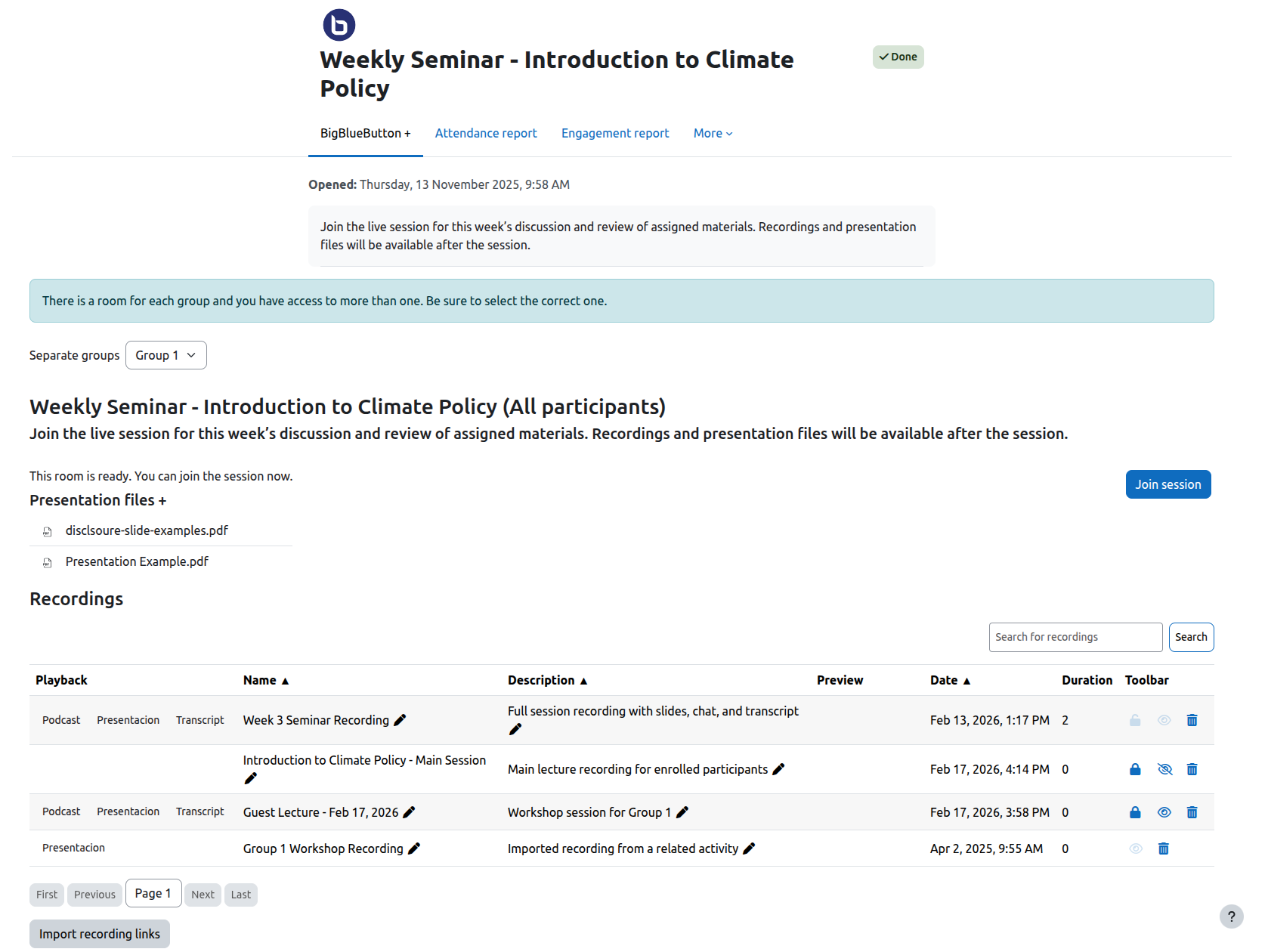
Screenshot of the bbbext_bnx plugin’s responsive HTML/CSS table for recordings.
What’s Next On the Roadmap
Because BNX is a framework, not a finished product, the roadmap is the interesting part. The same extension model that powers the lobby and the recordings view is what unlocks everything below, each one shipping as a sidecar subplugin, on its own timeline, without us touching the core. Some are already in flight as their own BNX modules.
- Multiple pre-uploaded presentations. Pre-uploading a single presentation is already part of the core. BNX takes it further by letting teachers attach several presentations to a session in advance, ready to switch between mid-class so a lesson can move from slides to a worksheet to a reference deck without anyone scrambling at the bell.
- Early teacher access to rooms. Give instructors a way to enter the room ahead of students to check audio, lay out slides, prep breakouts without artificial waits or workarounds.
- More reliable group session handling. Smoother behavior for courses that lean heavily on Moodle groups and groupings.
- BNX Insights. A sidecar that passes the Moodle course roster into the BigBlueButton session, so the teacher sees a list of expected attendees, not just who showed up, but who’s missing. It also surfaces relevant Moodle context as in-session alerts inside BBB, putting the right information in front of the teacher exactly when they need it.
- BNX DataHub. A companion sidecar that exposes session and recording data to downstream tools (reporting, analytics, integrations) through a clean, secure interface, without anyone needing to wire into core directly.
- Customer-specific extensions. Bespoke behavior for individual deployments, packaged as their own sidecars, no impact on anyone else’s upgrade path.
And that list is deliberately not closed. The whole point of building a framework is that we don’t have to predict every feature in advance, we just have to make sure the next one can plug in cleanly. BNX is designed so it can.
Where It Goes From Here
Moving BigBlueButton into Moodle core in 2021 was about reach, making sure every Moodle teacher had a virtual classroom available out of the box. BNX is about depth: taking that solid foundation and making it noticeably better to use, while opening a path for everything that comes next.
If you run BigBlueButton on Moodle today, BNX is a drop-in install that improves the experience immediately. If you’re thinking about what your virtual classroom needs to do six or twelve months from now, it’s also the surface those features will arrive on.
We’re just getting started.
Get BNX
BNX is available now from the Moodle Plugins directory: moodle.org/plugins/bbbext_bnx. Install it alongside the core BigBlueButton activity and you’re set. No migration, no fork, no risk to your existing setup.